v24.7.17.1
July 17th, 2024
The following items were released on July 17th, 2024:
Enhancements
-
Gauge Tool to Load Cars for Inspection
-
This update allows users to utilize the gauge tools when loading their cars. After the user confirms load, this will feed into the inspection process that was started for that car.
-
Navigation:
i. Yard Management: Inspection > Select facility > Complete arrival inspection
ii. Operations: Gauge Tools > Load car
-
-
Send BOL with Accepted with Error
-
After a shipment is completed on Wheelhouse, the responsible party receives emails with status updates. Previously, all other parties would only receive an email with the BOL after the shipment has received an "ACCEPTED" status from the railroad. This enhancement allows all parties to receive an email with the BOL when the status is "ACCEPTED WITH ERROR".
-
Note that the BOL will be watermarked with "ACCEPTED WITH ERROR" to ensure that parties are aware that it is not the final version.
-
-
Shipments for Empty Cars
-
Following the feature that allows users to bill empty cars back to their owners, this enhancement allows users to select the product when creating the empty template. This ensures that each shipping template is linked to a product, enabling users to easily create new shipments for that template.
-
Navigation: Operations: Shipments > Empty Templates > Create New template/Edit Existing Template > Create New Shipment
-
-
Download Table with Less than 10000 Records
- Users can now download up to 10,000 records from a Wheelhouse table as an asynchronous request, receiving the CSV export via email. For tables that have over 10,000 records, it is recommended to filter the table to the specific data set required before downloading.
Bugs
-
Reset Password Link
- Fixed a bug that prevented users from resetting their password from the login page. The fix ensures that users receive an appropriate reset link via email and can successfully change their password.
-
SSO Users
- Resolved an issue where users could create accounts if they attempted to sign into Wheelhouse via SSO without having an account created by their Wheelhouse administrator. This fix ensures that only registered users can sign in, maintaining proper account management and security.
v24.7.3.1
July 3rd, 2024
The following items were released on July 3rd, 2024:
Enhancements
-
Updated Wheelhouse Documentation
-
Wheelhouse Documentation site has been updated to showcase the new VantEdge Colors. View here.
-
The link to the release notes housed on Wheelhouse has also been updated to the new URL. View here.
-
Navigation: Login to Wheelhouse > Open Menu > Access version history and release notes
-
-
Retrieve large Reports as CSV
-
This enhancement allows users to retrieve a CSV file of their report containing more than 10,000 records. Users will receive an email with a link to download the report as it becomes an asynchronous request. Note: If the report contains fewer than 10,000 records, the CSV will be downloaded immediately.
-
Navigation: Reports > Create/Edit a report > View Report > Click CSV button
-
-
Mandatory Origin rail facility in Invitations
-
For users who send rail contract invitations to their customers through Wheelhouse to place orders will now be forced to specify the origin rail facility before sending out the invitation. This ensures that rail orders are always configured from Sellers’ origin facility to Buyers’ Destination facility.
-
Navigation: Partners: Invitations > Create invitation > Type: Rail Contracts > Set Default Origin
-
-
Freight Forwarder Information in Shipments
-
This update allows users to add a freight forwarder party to their shipments, ensuring that this information is sent to the railroads via EDI.
-
Navigation: Contracts: List > Edit contract > Shipping schedules > Parties > Add Freight Forwarder
-
-
Enhanced Partner Portal Notifications
- As part of the partner portal for rail orders, sellers now receive an email notification when their partners (buyers) place a new nomination or update an existing nomination, ready for review and approval. This update allows sellers to preview the nomination details before being directed to Wheelhouse for a more extensive review and approval.
Bugs
-
Return to Filtered Table View
-
A bug that prevented users from returning to their filtered table view after opening a form has been fixed. Users can now return to their filtered view even after exiting the page, ensuring a seamless experience when navigating the application.
-
Navigation: Any table screen on Wheelhouse > Apply filters > Exit page and return to it
-
v24.6.11.1
June 11th, 2024
The following items were released on June 11th, 2024:
-
Feature: BOL attachment to Trips
-
This enhancement allows users to attach Bills of Lading (BOLs) to trips within Track and Trace. This ensures users can accurately relate data from the railroad with BOLs shared by their clients. The built-in AI reads the BOL and automatically saves the extracted information with the trip.
-
For more information about this enhancement, please contact VantEdge Support at support@vantedge.com.
-
Navigation: Track and Trace -> Trips -> Select a trip and upload BOL
-
-
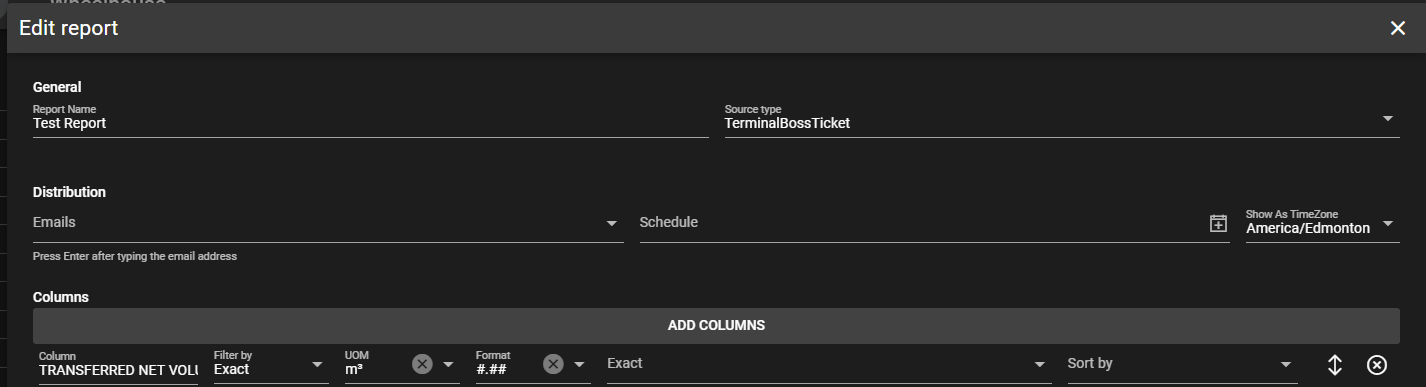
Enhancement: Unit of measurement selection on V2 TBOSS Sync Reports
-
The enhancement that allows users to select their choice of Unit of Measurement for quantity columns has been added to the TerminalBOSS V2 ticket report.
-
Navigation: Reports -> Create/Edit a report -> Add quantity columns -> Select UOM
-
Screen View:
-
-
Enhancement: Adding Permissions to the History Logs
- This new enhancement ties permissions to the history logs of various modules, enabling company administrators to control which users can view the history logs.
-
Enhancement: Fleet columns on facility page and contracts table
-
This update enables users to assign fleets to various contracts and shipping schedules/patterns. Additionally, users can view the assigned fleets on the overview page for contracts and shipping schedules, making it easy to determine which fleets are allocated for different shipments.
-
Navigation:
i. Contracts: List
ii. Operations: Shipments -> Select facility -> Contract Schedules
-
Screen View:


-
-
Bug: Refresh Page
- This bug fix resolves an issue where using the refresh button would take users out of their current page and to the first available page within Wheelhouse. Now, when users refresh, they will remain on the page they were working on.
v24.5.28.1
May 28th, 2024
The following items were released on May 28th, 2024:
-
Enhancement: Rail Inspection
-
The rail inspection module now includes camera functionality, allowing users to capture and upload photographs relevant to the inspection process. For instance, users can take pictures of defects for cars that have been labeled as bad order.
-
Additionally, the rail inspection module now supports PDF downloads for inspection forms, enabling users to refer to the inspections at any time and store the data for auditing purposes.
-
Navigation: Yard Management: Inspection
-
-
Enhancement: Notify Users About New Releases
-
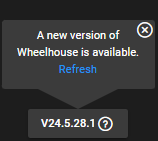
This enhancement introduces a pop-up notification in the left corner of the screen to alert users about new releases in Wheelhouse. The notification prompts users to refresh their screen to see the latest updates and includes a button that users can click to view the release notes.
-
Navigation: Sign in -> View pop up in the left corner of screen
-
Screen View:
-
-
Enhancement: Specified Timezone on Reporting
-
This report enhancement allows users to select the timezone for the time and date columns in their reports. For users with multiple sites in different timezones, this feature enables them to view a unified report that reflects their chosen timezone.
-
Navigation: Reports -> Create/Edit report
-
Screen View:

-
-
Enhancement: Hazardous Certification
-
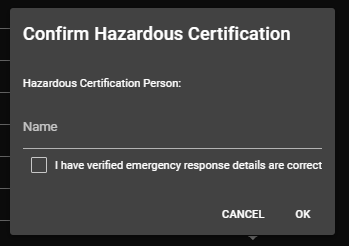
This enhancement introduces a validation layer for shipments, requiring users to acknowledge the hazardous certification for the commodities before they can proceed with the shipment.
-
Navigation: Operations: Shipments -> Select facility -> Contract Schedules -> Create new shipment -> Ship car(s)
-
Screen View:
-
-
Enhancement: Copy Existing Users on User
-
This enhancement enables users to create a new user by copying the permissions from an existing user, simplifying the process of granting identical access within the application.
-
Navigation: Configuration -> User Administration
-
Screen View:

-
-
Enhancement: Facility Notifications
-
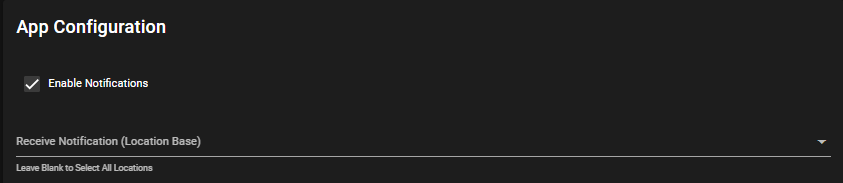
This enhancement allows users to select which facilities they would like to receive notifications for, and provides the option to disable notifications altogether.
-
Navigation: Configuration -> User
-
Screen View:
-
v24.5.14.1
May 14th, 2024
The following items were released to Wheelhouse on May 14th, 2024:
-
Feature: Rail Inspection
-
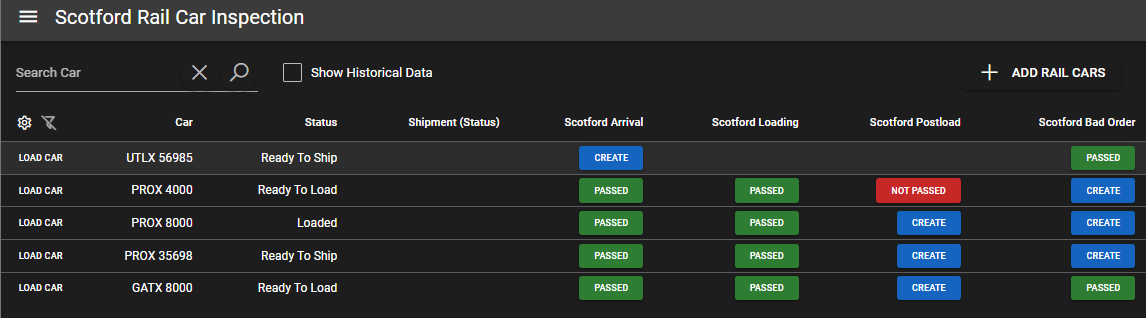
The rail inspection module marks the inaugural addition to the Yard Management suite on Wheelhouse. This feature empowers users to conduct thorough inspections of rail cars at various stages, including arrival, loading, departure, and identifying any defective cars. The workflow initiates with administrative personnel creating inspection form templates directly within the application, subsequently assigning these forms to the facility. Operators then seamlessly execute the inspection workflow for each incoming and outgoing car, ensuring comprehensive monitoring and maintenance throughout the process.
-
For extensive details about this feature, please contact our support team at 📫 support@vantedge.com.
-
Screen View:
-
-
Enhancement: Metric Form on Gauge Tools
-
The gauge tool module has been enhanced to accommodate operators utilizing both imperial and metric units. Previously restricted to imperial units only, this update now provides flexibility for users to work with their preferred measurement system, enhancing accessibility and usability across diverse operational contexts.
-
Navigation: Operations -> Gauge Tools
-
-
Bug: Limit on Report name
-
Previously, users encountered a limitation when creating reports, with a character limit of 50 preventing them from saving reports with longer names. This bug fix expands the report name capacity to 100 characters, allowing users to create more descriptive and detailed report names. Additionally, the update includes a proper error message notification if the character limit is exceeded, ensuring a smoother and more user-friendly experience.
-
Navigation: Reports -> Create/Edit report
-
-
Bug: Creating Templates for Empty Billing
-
This bug prevented users from creating shipping templates for billing empty cars, which has now been successfully resolved.
-
Navigation: Operations -> Shipments -> Select facility -> Empty templates -> Create New Template
-
v24.4.24.1
April 24th, 2024
The following items were released to Wheelhouse on April 24th, 2024:
-
Enhancement: Unified Party and Facility Management for Buyers and Sellers
-
For the buyer: This enhancement simplifies party and facility management for clients placing rail orders and managing their own shipments within Wheelhouse. Previously, users had to maintain two separate versions of the same party: one for their shipments and another for orders to sellers. With this update, users can now manage just one version of parties and facilities, streamlining the process and allowing for consistent use across both shipments and the order portal.
-
For the seller: This enhancement ensures seamless management of parties and facilities for sellers receiving orders from multiple partners. Sellers can now view records used by their partners in rail orders, although they cannot edit or delete them. Unlike the previous iteration, where revoked partnerships led to the removal of partner-related data, parties and facilities from partners are now retained even after revocation, albeit remaining uneditable. This update provides sellers with greater visibility and control over their own data while maintaining access to partner information for reference purposes.
-
For extensive details about this enhancement, please contact our support team at 📫 support@vantedge.com.
-
-
Enhancement: Validation on Shipper ERP Information for Nominations
-
This enhancement ensures that the buyer enters the emergency response plan (ERP) information for a shipper before saving/sending a rail nomination to a seller. Buyers will recieve an error message if they try to save or send a nomination without shipper's ERP information. This prevents any errors in shipping process or rejection from the railroad due to incomplete data.
-
Navigation:
i. Configuration -> Parties -> Add/Edit Party -> Emergency Response Plan
ii. Partners: Orders -> Edit an order -> Add/Edit Shipping Schedules -> Parties dropdown -> Select Shipper
-
v24.4.17.1
April 17th, 2024
The following items were released to Wheelhouse on April 17th, 2024:
-
Feature: Billing Empty Railcars on Wheelhouse
-
This latest feature revolutionizes billing processes within Wheelhouse, extending its capabilities beyond billing loaded cars to now include billing empty cars as well. Previously, users were restricted to billing only loaded cars, but with this enhancement, they can seamlessly follow the familiar format for billing loaded cars, now with minor enhancements. By incorporating this feature, users can streamline their day-to-day operations directly within the app, eliminating the need for multiple software solutions for billing purposes. This enhancement not only enhances user efficiency but also simplifies the billing workflow, empowering users to manage all aspects of their operations efficiently within Wheelhouse.
-
For extensive details about this feature, please contact our support team at 📫 support@vantedge.com.
-
-
Feature: TBOSS V3 Tickets available for Partners
-
This feature enables users to share tickets generated from TerminalBOSS V3 with their partners. Upon receiving an invitation, partners gain access to relevant truck tickets pertaining to their operations. They can conveniently download the associated Bills of Lading (BOLs) for their use. By facilitating seamless sharing and access to critical documentation, this feature enhances collaboration between users and their partners, streamlining workflow processes and improving overall efficiency.
-
For extensive details about this feature, please contact our support team at 📫 support@vantedge.com.
-
-
Enhancement: Setting Defaults on Invitations for Rail Contracts
-
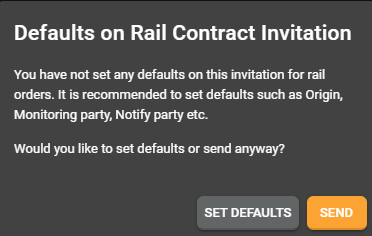
This enhancement introduces a streamlined process for users sending rail contract invitations to their partners by prompting them to set defaults. These defaults empower users to maintain control over critical conditions such as setting the origin shipping facility, monitoring parties, and notify parties. If these conditions remain consistent for all orders originating from the partner, users can now conveniently establish them as defaults. By implementing this feature, users can ensure consistency and efficiency in their operations, saving time and effort by eliminating the need to manually set these conditions for each individual order.
-
Navigation:
i. Partners: Invitation -> Add/Edit Invitation -> Resource: Rail Contract -> Fill the form -> Send Invitation -> Warning Popup
-
Screen View:
-
-
Enhancement: Required fields on Rail Configuration Forms
-
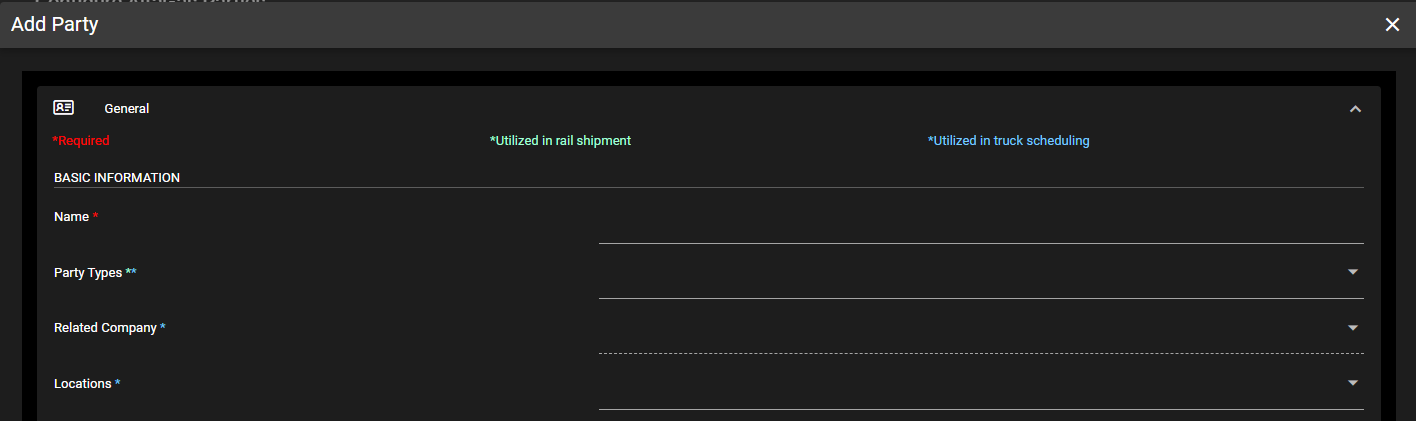
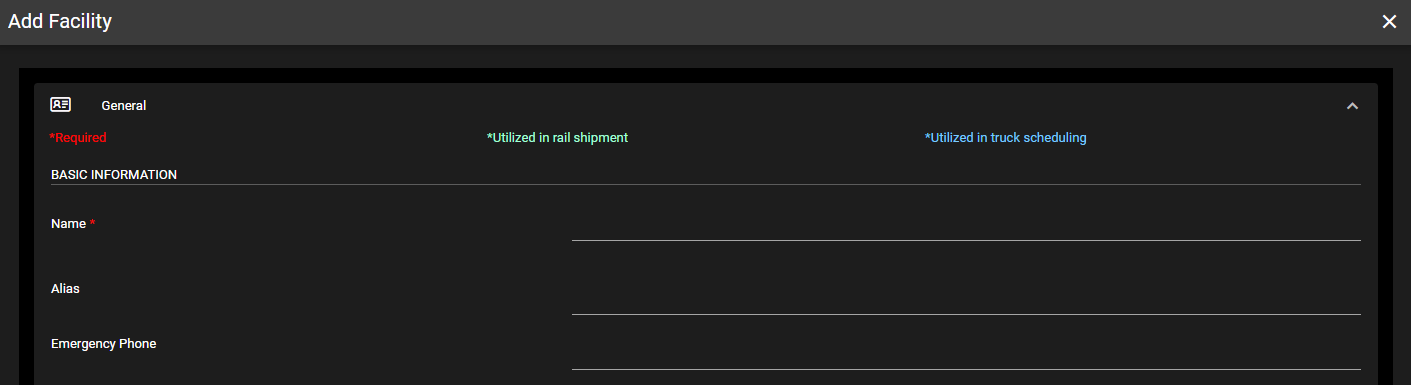
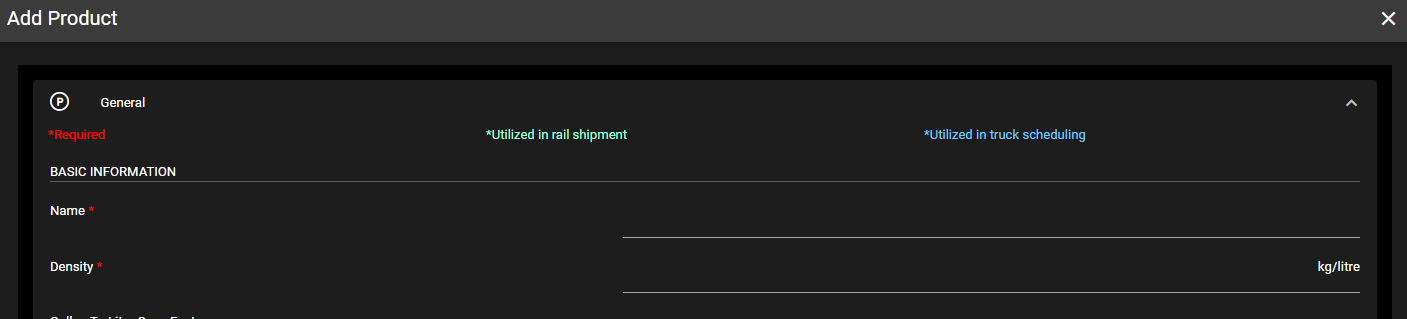
This enhancement introduces clear visibility of required fields in the parties, facilities, and product forms, distinguishing between those essential for rail shipments and truck scheduling. Users can now easily identify which fields must be filled out before saving, ensuring data completeness and accuracy. By providing this distinction, the software streamlines the process of data entry and validation, reducing errors and ensuring compliance with specific transportation modes.
-
Navigation:
i. Configuration -> Parties -> Add/Edit Parties
ii. Configuration -> Facilities -> Add/Edit Facilities
iii. Configuration -> Products -> Add/Edit Products
-
Screen View:
-
-
Enhancement: Validation for Rail Orders
-
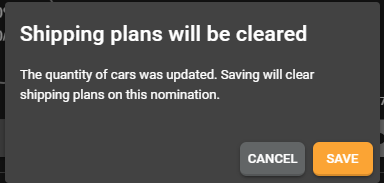
This validation feature enhances user experience by notifying customers when they attempt to change the number of cars on a nomination with an existing shipping plan. By alerting users of this scenario, the system ensures that buyers can review and adjust their shipping plans accordingly to accommodate the new number of cars. This capability empowers users to seamlessly manage their nominations and adapt to changes in car quantities while maintaining clarity and consistency in their shipping plans. Additionally, for sellers, this feature eliminates confusion by allowing them to follow the schedule chosen by buyers without any ambiguity or disruption.
-
Navigation:
i. Partners: Orders -> Edit an order -> Add/Edit Shipping Schedules -> Schedule dropdown
-
Screen Views:
-
-
Enhancement: Emails received for new vs existing orders
-
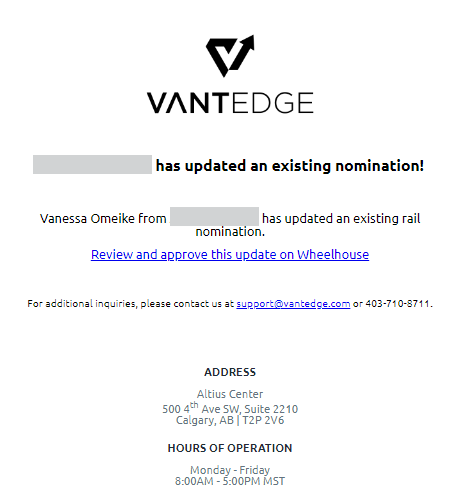
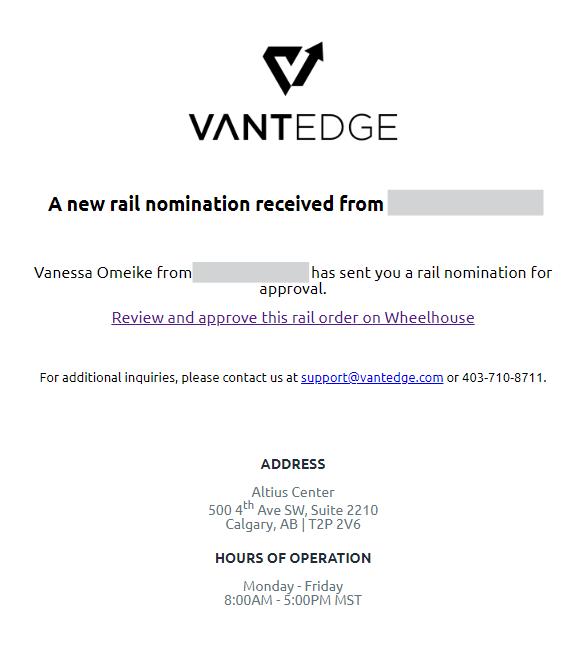
This enhancement in Wheelhouse brings clarity to email notifications for rail orders by distinguishing between new and modified nominations. Previously, sellers received the same email template for both scenarios, leading to confusion. Now, with distinct notifications, sellers can easily identify whether an existing nomination has been changed or if a new one has been created. This clarity empowers sellers to make informed decisions promptly, improving efficiency in the nomination approval process and enhancing overall user experience on the platform.
-
Screen Views:
-
v24.4.4.1
April 4th, 2024
The following items were released to Wheelhouse on April 4th, 2024:
-
Parties and Facilities: Address Fields Enhancements
-
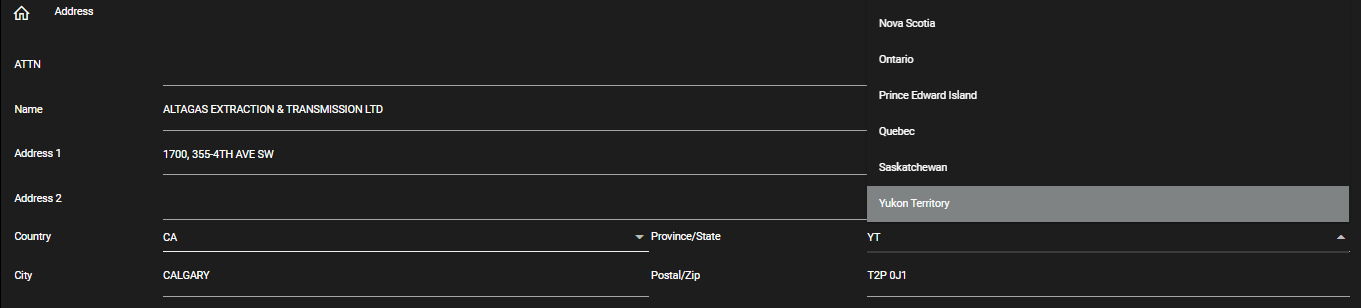
This enhancement simplifies the process of selecting the country and province when creating or editing a party or facility in Wheelhouse. Users can now choose their country and province from dropdown menus instead of manually entering the information. This streamlines data entry and ensures accuracy by providing predefined options. Additionally, upon selection, the system automatically converts the selected country and province names to their abbreviated versions, aligning with the format required for transmission to the railroad. Overall, this update enhances user efficiency and data consistency within the platform.
-
Navigation:
i. Configuration -> Parties -> Add Party/Edit Party -> Address section -> Select country and province/state
ii. Configuration -> Facilities -> Add Facility/Edit Facility -> Address section -> Select country and province/state
-
Screen View:
-
-
Carta Porte Requirement Updates
-
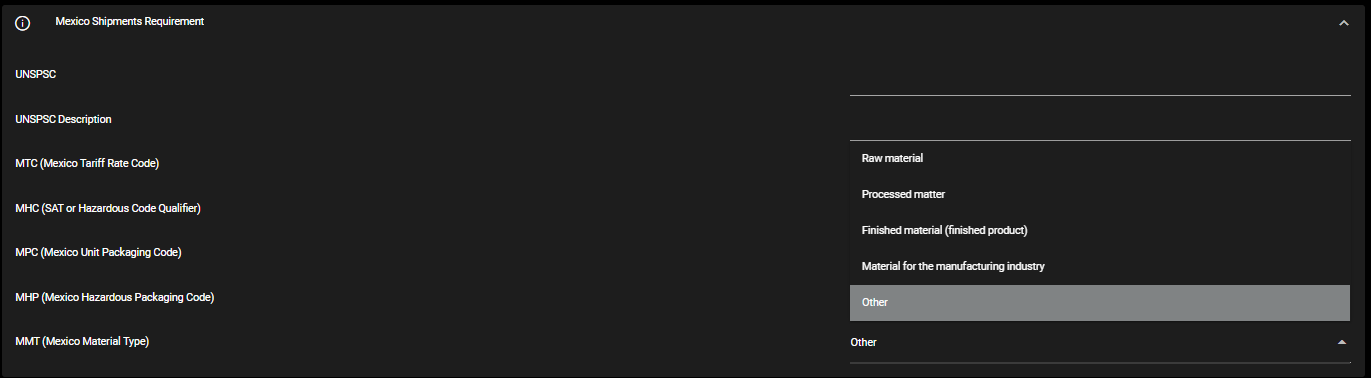
In response to the updated Carta Porte requirements for shipments to Mexico, the Mexico material type field in Wheelhouse has been enhanced to align with the selections specified by the railroad. Users can now choose from the following options when specifying the material type for their shipments to Mexico: Raw material, Processed matter, Finished material/product, Material for manufacturing industry, and Other. This update ensures compliance with the new regulations and provides users with accurate and relevant options to classify their shipments effectively. Navigation: Configuration -> Products -> Add/Edit Product -> Mexico Shipments Requirement -> MMT (Mexico Material Type) field
-
Screen View:
-
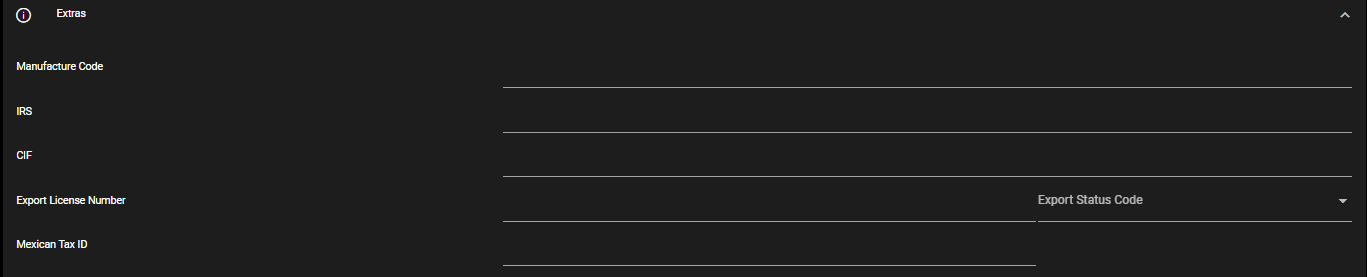
ATTENTION: The new requirements effective on April 1^st^ include a few workflow enhancements for Mexican shipments:
-
Create Importer parties. Navigation: Configuration -> Parties -> Add/edit a party -> Select party type: Importer
-
Mexican Tax ID field is required. Navigation: Configuration -> Parties -> Add/edit an importer party -> Open Extras section -> Enter "Mexican Tax ID" field
-
Importer field is required in shipping schedule. Navigation: Contracts: List -> Open a contract -> Edit a shipping schedule -> Open "Parties" dropdown -> Select a party in "Importer" field.
-
Required fields in transborder section of shipping schedule: US Custom Broker, Mexican Custom Broker, Export Declaration Type, Export Reference Number. Navigation: Contracts: List -> Open a contract -> Edit a shipping schedule -> Open "Transborder" dropdown -> Fill in required fields.
-
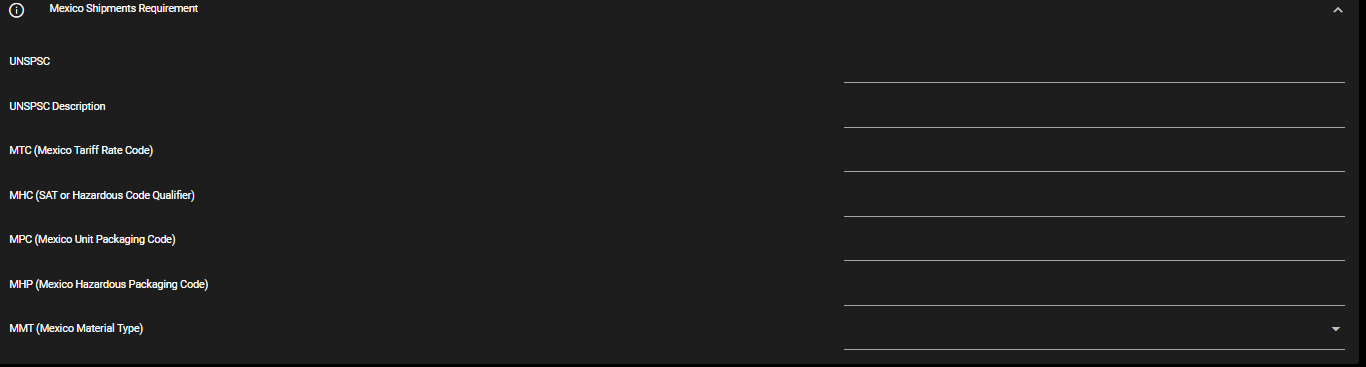
Required fields in Products form: UNSPSC, UNSPSC Description, MTC, MHC, MPC, MHP, MMT. Navigation: Configuration -> Products -> Add/Edit Product -> Mexico Shipments Requirement -> Fill in required fields.
-
Screen Views:



-
-
-
Auto refresh on new company selection enhancement
- This enhancement streamlines the user experience for individuals managing multiple Wheelhouse companies by allowing them to switch between companies effortlessly. With this update, users no longer need to manually refresh the page when switching companies. Instead, the system automatically refreshes the page details to reflect the data of the newly selected company. Additionally, if the current page does not exist for the selected company, the system seamlessly navigates to the first available page relevant to that company.
-
Clear Gauge Tool on Save
-
This enhancement streamlines the process of using the gauge tool module in Wheelhouse. Now, users can load a rail car, save their action, and seamlessly transition to loading another railcar without any manual intervention. Upon saving, the gauge tool automatically clears out the previous car details, ensuring a clean slate for the next operation. This improvement enhances user efficiency by eliminating redundant steps and simplifying workflow management within the platform.
-
Navigation: Operations: Guage Tools -> Fill out form -> Confirm load & save -> Enter new car information.
-
-
Last Activity Timestamp within User Admin
-
Within the user administration module on Wheelhouse, Wheelhouse administrators can now view the last activity timestamp of users within their company. This functionality is particularly helpful for auditing purposes, allowing administrators to track user engagement and monitor activity levels across the platform.
-
Navigation: Configuration -> User Administration -> View Last activity column
-
-
Ratable Button on Shipping Schedule/orders
-
With this enhancement, users can now define a shipping pattern as \"ratable\" when placing orders with rail product sellers or creating their own shipping patterns. This functionality is particularly useful when there are no specified dates for shipping cars. For users responsible for billing cars, this feature allows them to differentiate between shipping patterns with specific shipment dates and those identified as ratable. It\'s important to note that enabling the \"ratable\" option disables the auto-schedule or manual scheduling of cars on specific days, ensuring clarity and consistency in scheduling processes.
-
Navigation:
i. Partners: Orders -> Open an order -> Edit a shipping schedule -> Open schedule dropdown -> Click on ratable button
ii. Contracts: List -> Open a contract -> Edit a shipping schedule -> Open schedule dropdown -> Click on ratable button
-
Screen view:

-
-
Default to Connected Railroad Facilities
-
This enhancement on the shipments page ensures that the default view always displays the facilities connected to the railroad. By doing so, users can intuitively locate and select the appropriate facility for managing schedules, shipments, and cars. This improvement enhances user experience by providing quick access to relevant information, streamlining workflow navigation, and ultimately increasing overall efficiency within the platform.
-
Navigation: Operations: Shipments -> Select facility
-
Screen View:

-
-
Scheduled/Shipped Columns to Schedule Page
-
For operators managing shipments across multiple shipping patterns, a new feature streamlines the process of identifying patterns with outstanding cars to be shipped. This enhancement introduces four new columns: \"Scheduled (month)\", \"Shipped (month)\", \"Scheduled (today)\", and \"Shipped (today)\". These columns offer valuable metrics on the number of cars needed for each shipping pattern, either for the entire month or daily. While most values are represented by numerical figures, patterns on a ratable schedule for the month will display \"Ratable\" instead. This addition enhances operational visibility and enables operators to efficiently prioritize and manage shipments based on real-time dat1.
-
Navigation: Operations: Shipments -> Select Facility -> Schedules
-
Screen View:

-
-
Separating Billing into Multiple Sub Billings
-
This enhancement introduces the capability for users to generate a master billing with sub-billings nested within it. This feature facilitates the assignment of individual embargo permit numbers to each rail car, ensuring precise tracking and management. Additionally, it ensures that modifications made to one rail car will not impact others within the same master billing, preserving data integrity and providing a more efficient workflow for users.
-
For extensive details about this feature, please contact our support team at
 support@vantedge.com.
-
-
Reason for Voiding Billings
-
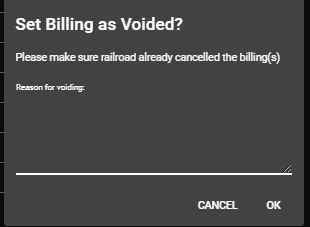
With this enhancement, users are now required to provide a reason before voiding a shipment in Wheelhouse. This ensures accountability and transparency in the voiding process. Additionally, the reason provided by the user is communicated to any contact listed to receive notifications related to the shipment, facilitating clear communication and minimizing confusion among stakeholders. This improvement enhances the integrity of the shipment management process and promotes better collaboration between parties involved.
-
Navigation: Operations: Shipments -> Select a facility -> Shipments -> Edit a shipment -> Click on "Billing Amendments" -> Click "Set Billing as Voided"
-
Screen View:
-
-
Truck Scheduling Slot Times in Facility Time zone
- Previously, the time zones for truck scheduling slots were determined by the user\'s location. However, with this enhancement, the time zones for truck scheduling slots are now based on the main facility\'s location. This improvement ensures consistency and accuracy in scheduling operations, aligning them with the specific time zone of the facility where the trucks are dispatched from or received.
v24.3.22.1
March 22nd, 2024
The following items were released to Wheelhouse on March 22nd, 2024:
-
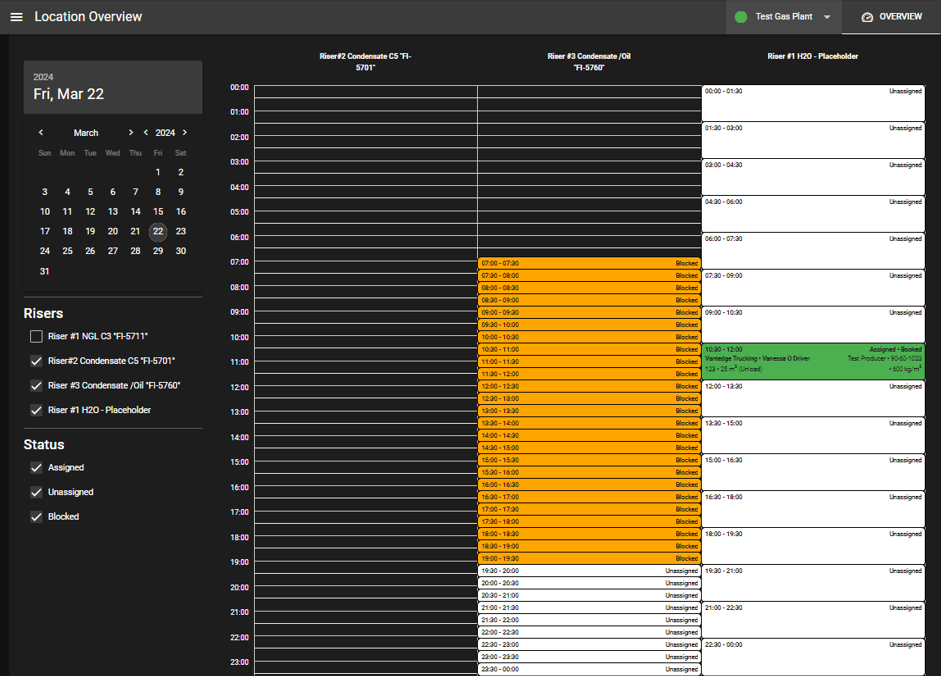
Truck Scheduler Enhancement: Facility Overview Page
- This enhancement provides operators at Wheelhouse companies with a comprehensive day-to-day overview of slot bookings for the various risers at their facility. Within this overview page, operators can efficiently manage assigned bookings and navigate expected driver arrival times. Additionally, operators can access historical riser activity from past days and plan for future bookings. This feature streamlines operations by offering a centralized platform for monitoring and managing riser activity, enhancing overall efficiency and coordination.
- Navigation: Scheduler: Locations -> Select Facility -> View “Overview” Screen
- Screen View:
-
Truck Scheduler Enhancement: Assigning specific products to risers
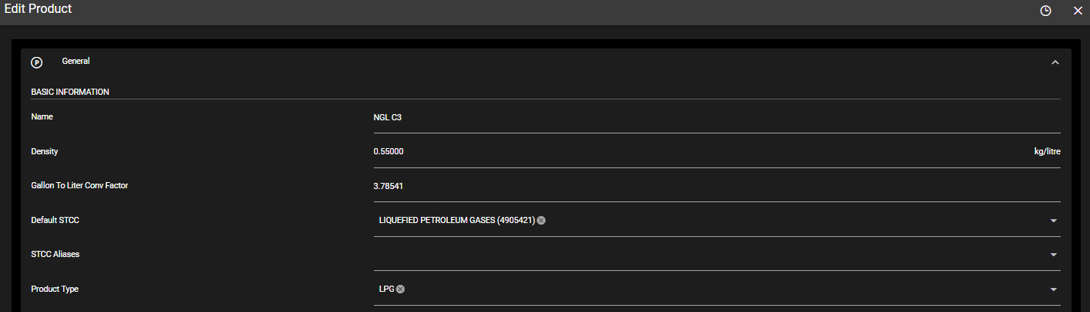
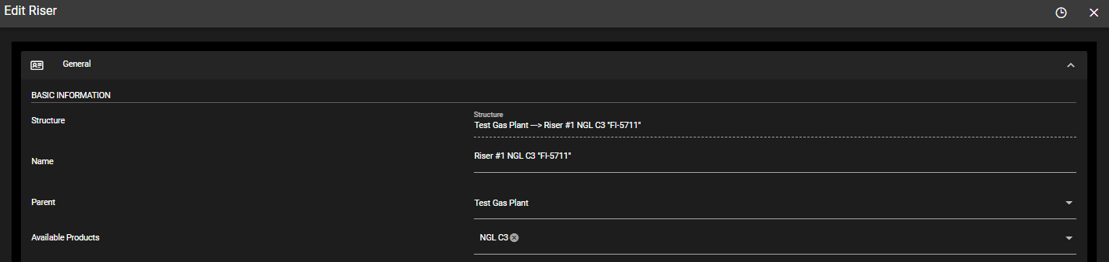
- This feature empowers users to define the products permitted for loading and unloading at their facilities. Once defined, these products can be assigned to specific risers, restricting truck drivers from handling certain products at designated risers. By implementing this functionality, users can enforce product-specific restrictions, enhancing safety protocols and operational efficiency at their facilities.
- Navigation:
- Configuration -> Products -> Add Product/Edit Product
- Configuration -> Risers -> Add Riser/Edit Riser -> Select products from “Available Products” field.
- Screen View:
- Truck Scheduler Enhancement: Specifying Required Fields for Slot Booking
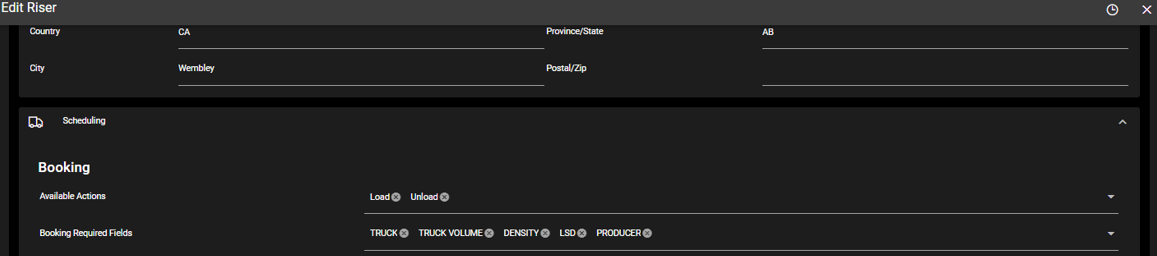
- This enhancement empowers users to customize the required fields on the slot booking form completed by the driver. These customizable fields include Truck Number, Truck Volume, Density, LSD, Producer, and Booking Type (Load and Unload). By specifying these required fields, operators at a facility can ensure they receive essential information to effectively direct drivers during their entry and exit from the facility. Additionally, this customization ensures proper booking alignment with the appropriate risers, enhancing overall operational efficiency and accuracy.
- Navigation:
- Configuration -> Risers -> Edit Riser -> Select booking type from “Available Actions” field
- Configuration -> Risers -> Edit Riser -> Select booking type from “Available Actions” field
- Screen View:
- Truck Scheduler Enhancement: Slot Booking Notes
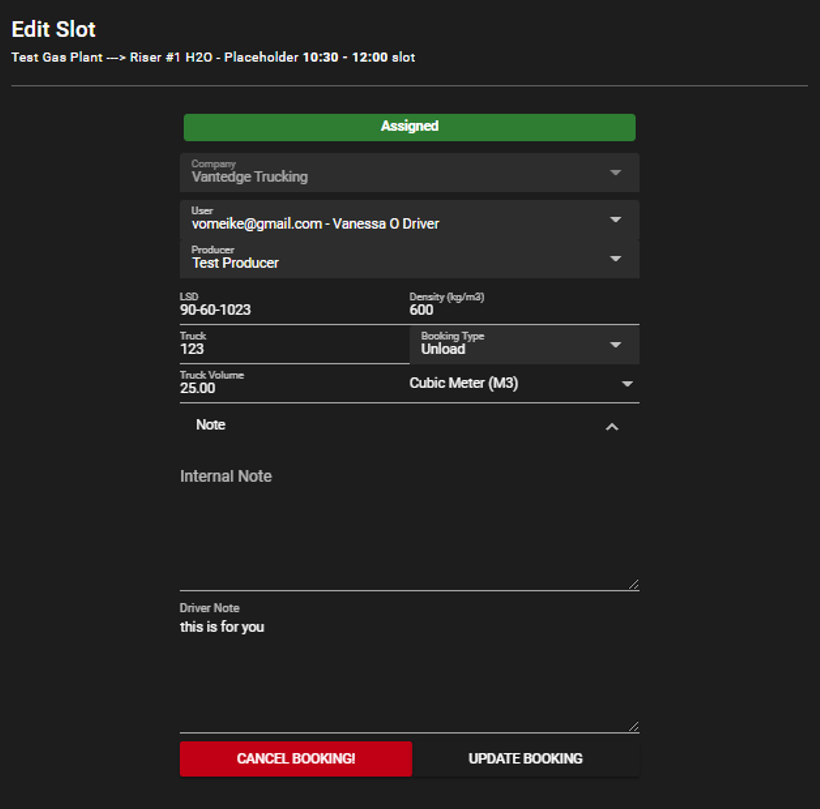
- This enhancement introduces the capability for users to attach booking notes to slot bookings, offering two distinct types: Internal Notes and Driver Notes. Internal Notes are accessible to riser owners (e.g., admins and operators), enabling them to include internal information pertinent to the booking. Conversely, Driver Notes are visible to the driver, facilitating communication between riser owners and drivers regarding their specific booking details. This feature enhances communication and collaboration between stakeholders, streamlining the booking process and ensuring clear and concise communication throughout.
- Navigation:
- Scheduler: Slots -> Select a location -> Edit assigned slot -> Add Internal note or Driver note.
- Scheduler: Locations -> Select a facility -> Click on assigned slot -> Add Internal note or Driver note.
- Screen View:
- Truck Scheduler Enhancement: Drivers App
- The enhancements in the admin sections of Truck Scheduler, means changes for the driver. These include:
- Ability to see booking notes from the facility operators on active bookings:

- Fields on booking form such as Product, Producer, LSD, Density:

- Ability to see booking notes from the facility operators on active bookings:
- Navigation:
- Home -> Active Booking
- Schedules -> Facilities -> Select a facility -> New booking.
- Order Portal Enhancements: Required Information for Shipping
- This enhancement ensures that buyers placing orders to sellers on Wheelhouse provide all necessary information required for shipping a railcar. The mandatory fields include Origin, Destination, Shipper, Consignee, Route, and Customs Broker (if the destination is outside the US). By mandating these fields, the system ensures comprehensive and accurate information is provided, facilitating smooth and efficient railcar shipping transactions between buyers and sellers on Wheelhouse.
- Navigation:
- Partners: Orders -> Select Order -> New Shipping Schedule -> Enter required fields
v24.3.7.1
March 7th, 2024
The following items were released to Wheelhouse on March 7th, 2024:
-
Enhancement: Update Driver on Slot Booking
-
This enhancement empowers dispatchers and admins for Wheelhouse companies and affiliated carrier companies to modify the assigned driver for a specific slot. This minimizes cancellations and promotes fairness in the slot booking process.
-
Navigation: Scheduler: Slots -> Select Riser -> Edit Slot Booking
-
-
Enhancement: Addition of Necessary Parties to Shipping Schedules
-
Two new parties, namely \"Account of Origin\" and \"Account of Destination,\" have been introduced in the party section used when creating shipping schedules. If users populate these fields with relevant information for shipments, it will be mirrored in the billing to the railroad and the details on the Bill of Lading (BOLs).
-
Definitions: \"Account of Origin\" refers to the party or entity that is responsible for the shipment at its starting point or origin. This could be the shipper or the party that initiates the transportation process. \"Account of Destination\" refers to the party or entity that is responsible for the shipment at its destination or final point. This could be the consignee or the party that receives the goods at the destination.
-
Navigation: Contracts: List -> Edit a contract -> Shipping Schedules -> Parties
-
-
Enhancement: Identifying Partnered Contracts
-
The addition of the order portal, where buyers can place orders for rail products through Wheelhouse, highlighted a need for clarity on the contracts list page. Previously, there was no distinction between contracts shared with partners and those that were not.
-
To address this, an enhancement has been implemented. Partnered contracts are now marked with a \"handshake\" icon beside the buyer\'s name. This visual cue significantly reduces confusion by clearly indicating which contracts are solely managed by the user and which ones involve collaboration with partners.
-
Navigation: Contracts: List -> Table View
-
-
Enhancement: Viewing the proposed railcar schedule on the Schedule page
-
The introduction of the order portal brings about an enhancement that fosters independent operations on Wheelhouse. Users involved in shipping cars can seamlessly access the requested rail car schedule for clients\' shipments directly within the platform. This eliminates the need for back-and-forth communication via email to send clients the requested shipment schedule, streamlining the entire process and enhancing operational efficiency.
-
Navigation: Operations: Shipments -> Select a facility -> Schedules -> Identify interested row -> Click calendar icon
-
-
Correction to February 27th, 2024, Release Notes: Rail Rates Feature
-
The rail rates feature in Wheelhouse empowers users to input shipping prices dictated by the railroad. This functionality proves valuable for any user with access to Track and Trace, as it enables them to track shipment prices based on specific products and destinations. This feature enhances transparency and facilitates efficient monitoring of shipping costs within the platform.
-
This feature integrates into reporting capabilities, allowing users to effortlessly add a new \"Rail Rate\" column to their reports. By incorporating this additional column, users can gain insights into movement costs associated with shipments.
-
Navigation: Configuration -> Rail Rates & Reports -> Create/Edit report -> Source Type: Trips -> Select "Rail Rate" column
-
"Rail Rate" column on reports was previously called "Movement Cost"
-
v24.2.27.1
February 27th, 2024
The following items were released to Wheelhouse on February 27th, 2024:
-
New Feature: Order Portal
-
The order portal feature in Wheelhouse is a pivotal advancement in collaborative functionality. Sellers can effortlessly establish partnerships with buyers, allowing buyers to place orders conveniently within the platform. This centralized process streamlines order management, giving sellers autonomy in accepting these orders for shipment. Additionally, buyers enjoy flexibility, easily modifying shipping destinations and involved parties. This enhancement ensures a more efficient and transparent exchange between partners in Wheelhouse.
-
For a more detailed understanding of how the portal works, refer to this guide: Order Portal
-
Seller Navigation: Contracts -> List -> Edit Contract
-
Buyer Navigation: Partners -> Orders
-
v24.2.22.1
February 22nd, 2024
The following items were released to Wheelhouse on February 22nd, 2024:
-
New Feature: Rail Rates
-
The rail rates feature in Wheelhouse empowers users to input shipping prices dictated by the railroad. This functionality proves valuable for any user with access to Track and Trace, as it enables them to track shipment prices based on specific products and destinations. This feature enhances transparency and facilitates efficient monitoring of shipping costs within the platform.
-
This feature integrates into reporting capabilities, allowing users to effortlessly add a new "Movement Cost" column to their reports. By incorporating this additional column, users can gain insights into movement costs associated with shipments.
-
Navigation: Configuration -> Rail Rates & Reports -> Create/Edit report -> Source Type: Trips -> Select “Movement Cost” column
-
-
Enhancement: Mexican Shipment Information Showing on All BOLs
-
An enhancement was added to ensure that Mexican shipment information now exclusively appears on Bills of Lading (BOLs) generated from shipments to Mexico. This refinement ensures that BOLs are clear and concise, containing only pertinent information for enhanced understanding.
-
Navigation: Operations -> Facility Selection -> Shipments -> Select a shipment -> View BOL
-
-
Enhancement: Accurate data representation of “Booked At” column
-
An enhancement was implemented within the schedule report source type, specifically for the "booked at" column. Previously lacking filtering capabilities, this column is now equipped with enhanced functionality. Users can conveniently filter the "booked at" column, allowing them to review data for specific time frames, providing a more targeted and efficient analysis of truck scheduling slots.
-
Navigation: Reports -> Create/Edit report -> Source Type: Scheduler -> Select “Booked At” column
-
v24.2.7.1
February 7th, 2024
The following items were released to Wheelhouse on February 7th, 2024:
-
Managing multiple shipping schedules and utilizing certain ones for shipping
-
Contracts -> List -> Edit Contract -> Add/Edit Shipping Schedule -> Open for Shipment
-
In a contract, multiple shipping schedules can be managed within it monthly. However, this makes it difficult when shipping a car as there are multiple schedules to choose from.
-
An enhancement was added to select what shipping schedules are “open for shipment” monthly. This minimizes errors when selecting what schedules to ship against
-
-
-
BUGFIX: Filter retention on TBOSS tables
-
TerminalBOSS: Sync Data -> Drivers, User Access, Routes
- A bug that was preventing these tables from retaining their filters when switching between wheelhouse screens has been rectified.
-
-
Assign Contracts to Shipments
-
Operations: Shipments -> Select Facility -> Shipments -> View a shipment record
- We added a functionality that allows users to connect a shipment to a contract, if this association is missing.
-
-
Correcting slot creation during day light savings
-
Scheduler -> Slots -> Add Slots
-
Previously, during daylight saving time when days could either be 23 or 25 hours long, the system encountered issues preventing the creation of slots due to overlapping times.
-
This issue has now been addressed. However, to ensure accurate slot creation on days affected by daylight savings, it is recommended to manually create slots instead of relying on a regular template.
-
-
v24.01.29.1
January 29th, 2024
The following items were released to Wheelhouse on January 29th, 2024:
-
Mexico Shipments: Updated Regulations
-
There are new regulations for Mexican shipments, specifically Carta Porte (further details available on the EDI Carta Porte Guide). Essential fields in Wheelhouse have been promptly updated to ensure compliance with these regulations.
-
Configuration -> Products -> Edit Product -> Mexico Shipments Requirement.
- MPC- Mexico Unit Packaging Code; MHP- Mexico Hazardous Packaging Code; MMT- Mexico Material Type
-
Configuration -> Parties -> Edit Party -> Emergency Response Plan
- Mexican Contact Name; Mexican Telephone; Mexican Email
-
-
v24.01.26.1
January 26th, 2024
The following items were released to Wheelhouse on January 26th, 2024:
-
Roll over/Clone multiple contracts in a single click
-
Contracts -> List -> Select one or more contracts -> Select action: Roll over or Clone
- We implemented an update that enables users to clone or roll over multiple contracts in a single action directly from the table view. Previously, users had to select individual contracts, edit them, and then perform the roll-over or clone action.
-
-
Railroad ETA: BNSF
-
A new column added to improve ETA information received from BNSF railroad. These tables show this new column:
-
Track and Trace -> Trips -> Table -> Column: Railroad ETA
-
Track and Trace -> History -> Car History -> Column: Railroad ETA
-
Reports -> Source type: Trips -> Column: Railroad ETA
-
-
-
Railroad Route Validation
-
Contracts -> List -> Edit Contract -> Add Shipping Schedule -> Route Field
- Validation has been implemented for the routing interchange field to ensure accurate entries. The format, illustrated by the example \'CN/BNSF/CP,\' uses the \'/\' character to separate railroads and signify interchange. It\'s crucial to note that the number of railroads should always be an odd number.
-
-
Table Arrows: Color change to increase visibility
-
All tables on Wheelhouse (eg Trips, Shipments, Sync Tables, etc.)
- We enhanced the visibility of table scroll arrows, allowing users to navigate seamlessly across pages for an expanded view of table records. The color transition involved changing from grey to white.
-
v24.1.16.1
January 16th, 2024
The following items were released to Wheelhouse on January 16th 2024:
-
Reports: Personalized UOM and Number Format
-
Reports -> New Report/ Edit report -> Select UOM or Format
- New feature on the reports module that enables users to select what UOM and number format they need in their reports. This is reflected in the table view on wheelhouse, in the csv downloads and in scheduled emails.
-
-
Scoring Driver Activity
-
Configuration -> Risers -> Edit Riser -> Scoring
-
Feature implementation for companies that utilize our truck scheduling module to prevent drivers from booking and cancelling slots abruptly, which minimizes availability for other drivers.
-
Configurations set by the company include: Negative points assigned to a driver when a booking is missed and hours in advance a booking can be cancelled without a penalty.
-
-
-
Single Sign On
-
The single sign on functionality has been enhanced so that companies can ensure that their users access Wheelhouse via SSO only.
-
Further documentation on how SSO works can be found here: VantEdge - Wheelhouse Manual - Single Sign-On SSO
-
v23.12.14.1
December 14th, 2023
The following items were released to Wheelhouse on December 14th 2023:
-
Fleet Management -> Table Filtering
-
Fleet -> Table -> Filter on Columns
- Bug rectified to prevent table from shifting on the page when searching for an item.
-
-
Shipments: Billing Cancelation
-
Operations -> Shipments -> Facility -> Shipments -> Billing amendments
-
Previously, shipments can only be cancelled when their statuses are one of the following: BOL-accepted, BOL-accepted-with error, closed, correction-open, correction-accepted, correction-accepted-with error, correction-rejected.
-
These statuses have been expanded to include the following: BOL-sent, BOL-acknowledged, correction-sent, correction-syntax-rejected, correction-acknowledged. A shipment/billing can be cancelled at any of these states.
-
-
-
TerminalBOSS V2 Reports: Date/Time Columns and Filters
-
Reports -> Source Type: TerminalBOSS Tickets
- Bug rectified to enable filtering on all date-time fields within the report.
-
-
Security Updates
- We have upgraded our TLS protocol to ensure users have version 1.2 enhancing the security of data transmission between your device and our servers.
v23.12.05.1
December 5th, 2023
The following items were released to Wheelhouse on December 5th 2023:
-
Limits: History page
-
TerminalBOSS V3 -> Sync Data -> Limits
- Added a history log to the Limit object to view changes to the object. Button can be found on the top right corner of the page.
-
-
Gauge Table: Tare Weight
-
Operations -> Gauge Tools
- Gauge table improved to automatically populate the Tare weight of a car once the car mark and number have been provided.
-
-
Temporary BOL Downloads
-
Operations -> Shipmemts -> Facility -> Shipment
- Select a shipment with any status and download the BOL. BOL has a watermark to reflect that the shipement does not have an "accepted" status from the railroad yet but the temporary BOL can be viewed.
-
-
TBOSS Site Access on Wheelhouse
-
Configuration -> Users -> Edit User -> Tboss Site Access
- Companies with WH-TBOSS sync and multiple TBOSS sites can now manage access to sync data based on the site assigned to the user.
-
-
Trips Map and Car History Linkage
-
Track and Trace -> Trips -> Map
- Users can select a section on the map which they are interested in. This selection shows the list of cars in that área and can be narrowed down to a singular car in the car history page.
-
-
Tickets: Columns Filter
-
TerminalBOSS V3 -> Sync Data -> Tickets
- Bug rectified to enable filtering on "Shipper" and "Source" fields
-
-
Schedule Type Reports Bug
-
Reports -> Source Type: Schedule
- Fields: "Booked by" and "Booked for "have been updated to ensure that the fields can be left empty without returning an error.
-
v23.11.22.1
November 22nd, 2023
The following items were released to Wheelhouse on November 22nd, 2023:
-
Gauge Tools
-
Operations -> Gauge Tools
-
We've incorporated a Tare Weight field into the Gauge Table section of the form. This field is automatically filled by the system upon entering the car mark and number.
-
The sensitivity of the gauge tool has been enhanced to display the minimum outage level, considering the maximum capacity/tare weight of the car.
-
In the "Actual Loading" section of the form, an error message will now appear if the car is overloaded, ensuring accurate data entry.
-
-
v23.11.21.1
November 21st, 2023
The following items were released to Wheelhouse on November 21st, 2023:
-
Versioning
-
Front end Versioning
-
Navigate to bottom of the side menu.
-
Version control is now visible to users. Format is based on the release day and number of releases on that day.
-
-
-
Bugs
-
Reports: Arrival at destination, date and time
- Reporting capability improved to capture date and time of arrival of cars at their destination. Previously, these dates were solely based on "Actual Placement" event.
-
Track and Trace Load time
-
Track and Trace -> History -> Car History and Track and Trace -> Trips.
-
Load time of these two pages were improved to accomodate large data pulls.
-
-
v23.11.8.1
November 8th, 2023
The following items were released to Wheelhouse on November 8th 2023:
-
GC Analysis Form
-
New form added to Wheelhouse Sync: TerminalBOSS V3 -> Sync Data -> GC Analysis
-
The form records the properties of a product at a selected location.
-
Users/Companies can add this form to their workflow in TBOSS/Wheelhouse.
-
-
-
Reflective Time zone
-
TerminalBOSS V3 -> Sync Data -> Tickets
-
Updated the table view to include the time zone on the date columns e.g. 2023-10-29 02:24 AM MDT.
-
Date/Time format is now consistent with Reports.
-
-
-
Wheelhouse Bugs:
-
Active filter
-
Configuration -> User administration -> Active toggle
- Fixed to ensure that when the active filter is enabled, only active users are being displayed on the screen.
-
-
Null values inclusion
-
TerminalBOSS -> Sync Data -> Tickets -> Filter field
-
Bug would prevent rows with any null values from displaying when a filter is applied to any field.
-
Fix has been implemented to correct this problem.
-
-
-
Province field not syncing to TBOSS
-
TerminalBOSS V3 -> Sync Data -> Companies -> Edit Province field
- Fixed to ensure that when the province field is changed on wheelhouse, it syncs accurately to TBOSS.
-
-
Pin and Effective Dates Validation
-
TerminalBOSS V3 -> Sync Data -> All objects
-
Constraint added to Pin field to ensure the only character type it accepts are numbers.
-
Constraint added to Effective end date field so ensure the selected date and time is always after the effective start date.
-
-
-
v23.10.31.1
October 31st, 2023
-
Bug:
-
Operations -> Facility -> Shipments -> Select a shipment -> "Contacts and BOL" -> Select a BOL
- The BOL format was deformed, causing BOLS to be split line by line across several pages. Fix was deployed to ensure that BOLs are populating in the right format.
-
v23.10.31.1
October 31st, 2023
The following updates were made to Wheelhouse on October 31st 2023:
-
Feature - Multiple BOL print
-
Operations -> Shipments -> Facility -> Shipments tab -> Select multiple shipments -> Print.
- Users can select multiple shipments (BOLS) and download them to their device.
-
Partners -> Shipments
- Users can select multiple shipments (BOLS) and download them to their device.
-
-
Feature - External API Usage: Authentication and Tokens
-
Configuration -> User Administration -> Select user -> Token.
- Users with the right permissions can view/regenerate their token to use for authentication when utilizing the Wheelhouse external API.
-
-
Feature - Slot Booking: Time gap
-
Configuration -> Risers -> Edit riser -> Scheduling -> "Gap between driver bookings."
- Field added to the "Edit Risers" page to allow users select the length of time in which a driver can book a new slot when they have an active slot.
-
-
Feature - TerminalBOSS V3: Adding a “Hierarchy” view to Products
-
TerminalBOSS V3 -> Sync Data -> Products -> Hierarchy
- Users can utilize the heirarchy view for products to properly visualize the parent-child relationship between products.
-
-
Bugs:
-
Default parties
-
Configuration -> Parties -> Select default sale and purchase party.
- Fixed to enable users to select their default parties. This step is needed for contracts to be created.
-
-
Ticket type filter and reporting
-
TerminalBOSS V3 -> Sync Data -> Tickets
- Updated to enable filtering on the "type" column.
-
Reports -> Edit report/new report -> add column -> Ticket Type
- Updated to include "ticket type" column to reports.
-
-
User and Driver Forms
-
TerminalBOSS V3 -> Sync Data -> Users/Drivers
- Bug that was preventing the user and driver forms from opening have been rectified.
-
-
Track and Trace Reports
-
Reports -> New report -> Source Type
- Source types updated for users with Track and Trace, to include "Trips", "Round Trips", "Detention", "Mileage" and "Loaded Rail Cars."
-
-
Wheelhouse Logo on Invitation Emails
-
Partners -> Add invitation -> Send invitation
- The wheelhouse logo within the invitation email was updated to reflect the proper logo size and format.
-
-